Showing posts with label z10. Show all posts

Tuesday, May 14, 2013

The woes of Type and Go on BB10 10.1

For anyone with a BB10 device running 10.1 software, you will of course know about Type and Go. Universal search on steroids as I call it. The ability to type a few letters from any home screen and start carrying out an action from that point. For example 'tw hello' will generate a result screen offering to post a tweet saying hello. (as pictured) 'em' will offer composing an email and so on.

Now this is fantastic, and rather than opening the twitter app, pressing compose new, and then starting to type, you can just start to type. Saves a few swipes, which will be great news to those who moan about all the swiping they have to do on this new OS.

However, if you dare to venture to things like 'em dav' or 'ca dav' the results are not quite so silky smooth. Calling Dave or emailing him should be a simple command, but using Dave as an example, most will have more that one of them in their phonebook. So instead of a simple result list of the 3 Daves in your phone book, it will list them all by every email address they have combined in there. If you have the contact linked to Facebook and other contact populating apps, you could find yourself presented with 10 email addresses, over kill maybe?

The solution here would be to have to results display the actual contact, as a singular name, from which you could then decide to pick the home, work, or private email of the person, rather than listing them all at once.

It's the same with the results for calls.

The solution is really quite a simple one, and I shall explain but not before saying this.

For years now, the act of sending an email has required a few presses here and there before we are ready to compose it, that's nothing new. So it really frustrates the hell out of me when an idea is put forwards to save a few milliseconds of your day, and sadly it doesn't work as well as was hoped. STOP being so bloody lazy and just do it the old way, it's really not a big deal.

For example, to start this email, from the home screen I typed 'em', compose email popped up, selecting that the compose screen appeared with the cursor in the address field, it typed 'bl' and it auto completed blog, and I got typing. Is that really a big deal? Seriously? Still seems pretty darn convenient to me.

Once again, I am aware that the address field of the compose email screen also digs through ALL your contact lists to offer you the email addresses of your contacts. And agree this is something that needs to be allowed to be filtered from a search setting. But that said, to others it's perfect. After all BlackBerry gave BB10 Balance which if being used would not be mixing in your private Facebook contacts with you business contacts list.

Something does indeed need to be done to allow the user some control over what appears where, but for now I offer a simple work around solution.

The contacts toggle screen pictured below allows you to sort out what shows in your main contacts list, so Facebook can be filtered out for example. The only real solution I can think of at this point, a quick fix, is to filter out the rubbish from your main contacts feed. Then when calling someone it may be easier to type 'co' select contacts from the results then start typing their name from the contacts screen. Slightly longer winded but effective all the same. Sadly these filters will NOT change what appears on the main type and go screen. 

Regards
Michael

Sent from my BlackBerry Q10


Monday, May 13, 2013

My gripes about BB10 and the handsets

So before I get started on this entry I just want to make one thing clear as day, I am NOT taking a dig at Blackberry here. I just thought with all the fanboi style posts I have made recently, it was about time I balanced the books a little and made an entry about the 'not so good' aspects of BB10 as a whole, and its devices, the Z10 and Q10.

I have spent a lot of time on Crackberry recently, trawling through the forums, and getting into discussions here and there about things I feel are genuine issues, from my experience with the handsets and OS at least.
Now that I have used the Q for a couple of weeks now (getting there anyway) I thought now would be a good time for this. So lets get going.

First up, the debate over screen size and quality. With 17,000 views and over 350 replies, for a balanced discussion about these matters, this thread is the place to be.q10-vs-z10-screen-size-debate
The intention of this thread was to simply hear some opinions about why some chose the Q with the physical keyboard over the Z and touchscreen. And to see what made people sacrifice some screen real estate for the experience of real buttons. As you can see, it became quite popular, and for the main part actually quite interesting to get an insight into how people use their handset, and what they demand from them.

For me, this is how I see it.
The Z and Q both have superb screens, both to view, and to operate inside the BB10 OS. Ultimately one of the two devices is going to be my favourite, or daily driver. And it wasn't long after opening the box to the Q10 that I knew which it would be. Having spent a couple of months with the Z, and got to know its keyboard pretty well, there is no doubt that the Z10 touchscreen keyboard (TSK) was quite simply the best TSK I have ever used. Trying to switch between that and the Galaxy S2 screen is a nightmare, with the S2 seeming slow and unresponsive, let alone unforgiving. 
The Z really does put most others to shame, in fact I will go out on a limb and say its the best TSK on the market today. With its predictive word suggestions learning how you speak, and its forgiving nature and smart auto correction, you can make a real mess of a whole sentence, and the Z will get what you mean, and sort it out. A bit like the relationship between doctors and pharmacists.

BUT, this is a gripe post remember, so lets get into the nitty gritty here.
As intelligent as the software for the TSK is, it can get a little carried away at times, and its intelligence and smart learning becomes its achillies heel. Make a typo too many times for a word it doesn't know to auto correct, and it will learn the typo, and use it to replace other attempts at the right word.
Example, I have a bad habit of typing 'ypu' instead of 'you'. By pressing the spacebar after making the typo after a while will actually confirm the word is indeed RIGHT. So it will now replace you with ypu on a regular basis. This is partially my fault for not seeing the word appearing and correcting it, and over time I can correct it in one of two ways...
1/ clear all the learned words and start over. Removing a single word from the catalogue is not an option at this point. 
2/ watching the space bar, and concentrating each time I type the word, and each time ypu appears, correcting it until the phone learns not to use it anymore.
Sadly both solutions require me to be less productive to solve a simple issue, admittedly of my own making.

The next issue with the touchscreens now moves onto the Q10. Like the 9900 was at launch, the screen of the Q10 is a little desensitised, and the last few mm's of the edges seem to have no real abilities. The line between bezel and beginning of the display is the issue here. The most common issue users are reporting is the lack of response to the End Call key. Frustratingly hammering away on the red part of the screen, long press, short burst of presses, but no end to the call. 
I have to be honest here and say that since the OS went from .238 up to .273 it seems less of an issue for me at least. There are other times when the screen seems a bit awkward to use, with the selection of small areas at the edge of the screen being problematic. On the odd occasion by pressing the very edge of the screen, you will actually select something that is just OFF screen. Almost as if the phone thinks it is displaying a slightly longer or wider image than it actually is. (if that makes sense)

Staying on the theme of screens, the other complaint that seems to be getting touted about is screen legibility in daylight. With the Q10 packing a sharp and crisp AMOLED display, the legibility of the screen for me on a bright sunny day has never been an issue for me. That said, if you don't keep your screen clean, that's when I notice the legibility becoming an issue, as the smears more than anything else cause the reflective issues. Others however state that regardless of how bright the settings are put at, reading the screen, along with the dark theme are simply impossible. Now we all have different eyes, and live in different countries, so I'm not going to doubt anyone here. But at the same time others, some well respected commentators on Blackberry and mobile devices, state they have NO issue whatsoever with reading the screen, day on day, in rather sunny parts of the world.

Like everything, all opinions are relative, so there is no right or wrong anywhere in this blog, just my own observations, and quotes from others with similar findings.

Lets get away from the screen now and dig a little deeper. How about the depths of the OS?
Now one of the big selling points of BB10 is the 'active panes'. For those not familiar, let me explain quickly. All mobile OS's these days claim to have true multitasking, leaving one application running properly while another is opened and used. The Blackberry way of doing this is to use active panes, this is where an application is minimised on the screen along with other apps that are running. Each of these applications is then capable of displaying a condensed version of its content while minimised. So for example a weather app will show a summary, a news feed will show individual headlines. 
I have to say the active panes are a great little thing, especially for watching for replies to tweets, or keeping an eye on the weather without constantly opening the apps. 
But again, this is about gripes so here goes again.
3rd party app devs seem to have really grasped the concept well, and made the active panes really used full, Blaq, CB, BeBuzz, all having great active panes.
BeBuzz, what is generally a notifications app have had the sense to use their active pane as a battery monitor, a great and helpful little tool especially with its 'time left' section.
However, Blackberry, the creators of these great little panes seem to have done very little with them at all. 
My example would be a simple one, the native clock.
Now the clock has 4 views. Normal clock, World Clock, Stopwatch and Timer. The most common one for me to keep open is the timer, being able just to flick the screen on to see how much time is remaining. Frustratingly, the native app minimised to the clock app only. So regardless of what display would be of use to you, you are left with just the simple clock view. I'm sure there has to be a way that the timer and stopwatch could minimise into usable active panes. If 3rd party devs can do it, come on Blackberry, sort it out.
Digging in a little deeper we start to find a few more little frustrating niggles that really get a bit irritating.
Type and Go function as a whole is a great idea, and can really speed up certain processes, such as sending a simple tweet, or FB update from within the OS. Simply typing 'tw' then starting to compose the tweet will see Type and Go offer the 'send tweet' option when you are done typing. Press it, and its done tweet sent. No opening apps, pressing compose etc, its all done simply and effectively from the home screens of the OS.
BUT (gripe time)
If you want to send an email you have a couple of options, and this is where it gets a little sticky. Typing 'em' will prompt the device to offer 'compose email' at this point. So you can press the option there, then immediately start typing the contacts name, which will present the list of options matching the letters entered, or after 'em' a space then start typing the contact name. Now both these are super efficient ways of getting an email started, there is no doubting that for a second, the problem however lays with the search function itself. Now I should add here that until the issue was raised, I had not noticed it. But once it was mentioned it is something you just become aware of.
Throughout the search settings of the device you can tell the OS where it should look for the information. Different apps, areas of the phone, and indeed 3rd party databases too. Sadly for some reason, the search parameters do not apply to email, so as you start to type the contact name, it will offer every contact matching the characters, including from apps like Facebook and Twitter. 
For those only using their devices for personal use, this is nothing more than a minor irritation. For those using it as business and personal, it becomes a little more of a headache. Contacts who have linked profiles within your device, it will drag down and offer every email address for them. Some might find this helpful, others a hindrance. Either way, it would be nice to have a little control over it.

The next issue for me, again deep within the heart of the beast is notifications.
Back in the days of OS7 the notification settings were so very simple. A little bland to look at, a little too simple maybe with drop down menus and separate sections of in and out of holster etc. The drop downs would offer a whole list of sounds which on selecting it, you could then hit 'try' and you would hear what you had chosen. 
For some reason with OS10 Blackberry have decided that simple was not the way, and nor was having options. Instead the new settings allow a few choice sounds and very little more. To get anything other than what they offer, you need to start browsing the device, and in doing so you dive into a complex sub menu after sub menu of places to find sounds. You are not able to preview the sound, instead you select it and return to the notifications screen. Upon which, if the sounds is not to your liking, you start over again.
I would love to have the simplicity of the notifications back. Heck they even took away all the sounds most of us were so familiar with.
Even the volume of the notifications is dumbed down to one simple slider that is the master control for all sounds within that notifications status, be it normal, loud, work etc. I loved the control of making one email far louder than the rest, hard to miss, and in my face, but at this point OS10 isn't going to allow that at all!

Along with notifications comes my beloved BeBuzz, the custom LED app which gives a custom colour flash to notify of emails from each account, and 3rd party app notifications too. For years now it has been my backup notifications, so if I miss the sound, I would have a visual notification which would repeat. Even with the phone on silent, I knew exactly which notifications awaited me without having to pick the handset up. Sadly with OS10 this isn't quite as smooth as it could be, mainly because the app must remain in an active pane to allow it to work. One simple closure of the wrong app results in NO LED notifications.
My gripe about this? Well its simple. With later versions of OS7 allowing this as a native app through certain carriers (so I am told), I was really hoping that the all singing and dancing OS10 would present us with the coloured LED options from within notifications settings. Alas, its not the case. So notifications are stripped out, dumbed down.... and still on boring old RED !

With all that said and done, I am still left applauding Blackberry on their amazing transition from being old and stuck in their ways, to the modern day, all singing, all dancing devices. People will always have a pop, whatever the state of the OS. When OS7 was the current system people commented on how out of date and boring BB now was, and how if they didn't move into the 21st century BB would fail for sure. Boring interfaces, physical keyboards, and tiny screens. 
Out came the Z10, lovely screen, great new OS in its infant stage, and a true new kid on the block, stepping the game up with its buttonless design and gestures for navigation. Needless to say, the opposition said it was a failure before it even got going, the legacy hardcore users said it was an insult to Blackberry, and the people in the middle bought it and formed educated opinions of it.
My opinion has always been simple. If physical keyboards stopped existing tomorrow, I now know I would have the safety of the Z10's beautifully thought out TSK to turn to. My productivity would drop, my web usage would plummet, but I would be able to use a device without wanting to smash it on the floor.

Then it was the Q's turn. The TRUE next generation of Blackberry in my opinion. Taking a proven system, a great form factor, and firing it way into the 21st century. Again, unable to please all of the people all of the time, there have been again been critics who feel it is blasphemy against all that Blackberry stands for, to launch a device like this. Complaining that keyboard shortcuts are missing which make the device SO unproductive, that other features are not present, and that its not a proper Blackberry without them.

Well, I guess to a degree I join those whiners, with my rant and gripes above. But with one key difference.
My comments, feedback, reviews, and suggestions are just that. I accept that BB10 is a new OS, and has a long way to go yet. Heck no OS has even been perfectly rolled out with no changes needed to it. And in its first few usable releases, I think OS10 has proven itself to be something that will really grow into something great. My comments are not meant to mock or put down this infant OS, but are there to create conversation, to put across my point of view, and hopefully in some small way, contribute towards the direction that the OS takes as is continues to evolve.

One final thing though...

BBM Groups, what the hell happened there?
After not having used groups for years now, I thought it would be nice to have a group for photography a few days ago, so out went the invites. After 10 or so joined, a few friends started commenting that they could no longer see the group, or had received weird notifications saying they could not join 'another' group as they were already at their devices maximum... then showing NONE! 
Being kicked out of a group is one thing, but what happened next is where it all gets worrying. Reports then started that peoples phones, from BBM to the whole OS had dramatically slowed down, some saying it was almost unusable. A couple even resorting to restoring their handsets, and one returning theirs to a store for an exchange, so bad had the issue got.
All issues that I am aware of occurred on a Blackberry Z10, most if not all were running OS 10.0. My Q10 on 10.1 seems unaffected by the issue. Either way, I hope the rollout of the fix for this is swift. Mainly as the BBM Groups function is now rather lovely, and I would love to get a group up and running again, but don't want people screwing up their devices to join.

Right, that will do me for now, I'm sure I will have other moans and songs of praise over the coming weeks.

Thanks for reading.

Wednesday, May 8, 2013

Dear Blackberry trackpad

My dearest trackpad, old friend, and great companion.
You came into my life in 2009, replacing my trackball, and making so much sense. An optical device replacing a physical ball that was oh so prone to getting clogged up when using the phone with greasy fingers or dirty hands. The way you reflected sunlight with that beautiful purple glow. Functioning with or without gloves, in all conditions, you changed the way I used my Blackberry forever.

Being able to zip around the screen with ease, selecting text, and accurately placing the pointer over the smallest of links, your accuracy was super. No more stuttering and spluttering across the screen as the trackball registered, then didn't, then did......

As first people doubted your ability to do what the faithful trackball could, like the move from a mouse with a ball to an optical mouse, its a big leap of faith for some. But the package the 8520 offered, complete with you, made it worth that leap of faith. After months of becoming best friends, you made your way onto the 9700 which just had to be mine.

As time went on it seemed like trackpad and Blackberry were a match made in heaven, but then this happened.... That's right, you know what I'm talking about.. YOU! You left me!

The first new handset to appear without you was the Z10, and of course it made perfect sense that you were not there, its a touchscreen after all. But then rumours of the Q10 appeared, and you were no where to be seen. They told us we would be OK without you, that things had moved on, we had changed and grown apart, but I wasn't so sure. When the day came when it was time for the Q10 to come into my life I was worried, would I cope?

So a week after getting my hands on the new love of my life, I thought it only fair to write you a letter to tell you how I am getting on without you, and to be honest, most of the time I don't think about you too much. But from time to time, there are those moment when I remember how you felt to use, and how easily we did some things together. Selecting text in long emails, selecting multiple messages to delete or move, and all those delicate and intimate things that only you could do.

Blackberry have given us options to move on from you, and I have to say I think I'm falling in love all over again, but I cant deny you were an important part of my life, and I will always remember you, and occasionally pine for you.
Thank you for everything you did for me, and all the fun times we had together.


PS for those a little worried, this is just a light hearted entry, and I have not lost the plot.... I lost that a LONG time ago!

Tuesday, May 7, 2013

One week later... My Blackberry Q10

Well its coming up for a week now since the mainstream launch of the Blackberry Q10, and I thought it was time to hammer the keyboard of the laptop for a while and give the Q a bit of a break. So while Z and Q sit on the side and rest for a bit, lets take a look at my first week (almost) with my latest Blackberry.

So, the Blackberry Q10 is the second handset to be launched from Blackberry since they changed their name from RIM. Sporting the almost entirely new BB10 operating system, its a far cry from my first Blackberry which was an 8320. Not quite as ancient as some out there who rocked the side scroller, but certainly old enough to remember how very different the operation of a Blackberry was then. That was WAY back in 2007. In fact its only in writing this entry that I had any idea I have been using a BB for 6 years now. Then again, given just how many of them I have got through in that time, maybe that's about right.
For those not in the know, this is an 8320..


Back then I could send and receive email while I was on the move, and occasionally if needed, check things on the internet. Browsing then was more necessity  than social and passtime. Oh how things have changed. But very quickly, if there is one thing I have never got over, it has to be the contrasting keys. With the numerical keypad being reverse colours, making it easier to type numbers. Small issue, and would totally ruin the current Q10, but that's my gripe over with.

So, leaping forwards a few years, and blasting past the 8520, 9700, 9900, and Z10 that all followed the first one, and we arrive at the current day. The first fair thing to say is, having experienced the progress from one device to the next, going from a trackball to the trackpad, and then to the trackless device, the progress has been tiresome at best, sometimes sitting so still, that to be a BB user felt like you were in a timewarp and heading backwards while the world around you shot forwards.

Well those days are gone now, and finally it feels like us BB users are on an even playing field with the rest of the smartphone users out there. I would even be so bold as to say that in some respects, we are a step ahead. In one respect a Q10 user has one asset to their disposal that no other real smartphone user has, and that's a physical keyboard. Sure there are other phones out there with physical keyboards, but at this point, none have the same processing power or abilities as the Q.

So, back on track, there was a first week with a Q10 meant to be going on here...

Receiving the box from the courier, the package was very small, and remembering how the Z10 had come packaged I knew what to expect. A phone, a battery, a SIM, a data cable and charger plug, and a cheap pair of headphones. So on opening the box and taking everything out, I was delighted to find a pair of the new premium headphones in there, and a week later I am still over the moon with them. The right balance between sound quality while maintaining some awareness of whats happening around you, like traffic.

Putting the phone together it was then time to see this glass weave battery cover there has been so much talk about. Having been torn between white and black handsets and finally settling for black, I was relieved when I finally felt the back cover in my fingers. Having used a Z for 2-3 months, I have grown used to the level of grip the back of that offers. All the preview images showed the glass weave for the black, and the Z10 style textured back for the white. Having never been happy with the back of the 9900, I was concerned the Q10 would be slippery with its glass weave... WRONG. Its lovely waxy and soft feel give it great grip in the hands, and belay any worries about letting it slip. So off to a good start then.

Powering up for the first time, I knew most of what to expect, with having been baptised into the world of BB10 with using the Z for a few months. All that was left to see was how well the gestures, screens and software would work with this new, non smiling physical qwerty.
Once the introductions were made it was time to get on with the formalities of setting the device up. First up, time to set up a new account, as you obviously cant run two devices on one Blackberry account. Even with the demise of BIS, things like Blackberry World, and Protect require you to have an account for each live device you are running. Obviously a straight device swap would just require logging in with your existing details. With new username and account running, it was time to get to know the Q.

Starting with what most would consider THE important part of a smartphones soul.. Apps! Personally to me they are a nice addition, but I am pretty content with the standard package of native apps on the BB10 devices, they do most things I want to do on a day to day basis. However, having already added a good few to the Z10's arsenal of weapons, I thought it only fair to equip the Q equally.
I would have liked to have done this, but sadly there are a few apps which have not yet ported over. Yes, its that age old problem, right OS, wrong device. And with the different form factors of the two being so far apart, it would be wrong to expect all apps to work out of the box. The only one I actually pine for right now is BeBuzz, no relation to Bieber!
I did however hear that Blackberry are helping the devs out by testing and automatically porting over any Z10 apps that are Q ready, and this should take place in the coming weeks. I sincerely hope BeBuzz is in there.

Speaking of native apps and software, I thought this was the right time to mention all is NOT well. While the 'shortfallings' of the Hub have already been discussed, I thought I would quickly touch on Twitter, and its native app on BB10. Yes its simple and easy on the eye, but its also pretty bland and a touch dumb too. The way it interacts with the contacts list for composing a tweet with a mention in it, the limited actions available from the app it self. It has a habit of repeating tweets, so on opening one, as it builds it will create a long list of the same text over and over. I wont go on for ages, but in short I find the native Twitter SO irritating, I wont use it. Instead I prefer to use Blaq, with its much nicer and more user friendly interface. Mentions on there are dealt with by a progressive search, with suggestions appearing at the top as you type the names. Unlike the native app which insists on opening a contacts list.

So working with the actual device on a day to day basis, I can only say its an absolute delight to use. I still switch between the Z and the Q, depending on which is closer to hand. The other deciding factor is what I am planning to do with the device, browse, view video or having a long blogging session or forum session.
I wont say gaming as that's truly not my forte, but know it is important to some people, and appreciate their needs.
Needless to say, having been housebound for most of the past week, forums like Crackberry have been my main haunt, and with the Q being the new kid on the block, the choice was pretty obvious. Me and the Q have spent some quality time over the past few days, putting it through its paces, and seeing what its really made of. Testing the battery to see what sort of beating it can take on a full charge. The camera seeing how all the different settings work, and what gives the optimal results, and of course the most important thing to me, seeing how well I can manage going back to a physical keyboard after months away.

With regards to the keyboard, a few days before the Q arrived I picked up my old 9900 for the first time in ages, and immediately became attached to the feel of keys under my thumbs again, could the Q really match that feeling. Well the short answer is yes! And exceed it too. Even though the difference is measured in millimetres rather than centimetres, the loss of the smile from the keyboard made me wonder how different typing would be. Well maybe its coming from the flatness of the Z, or maybe its just the difference in unnoticeable, but either way the new flat lines of the keyboard work fine, and typing is a joy. I am back in my old ways of typing for the sake of typing, and not having to stare at the sensationless buttons of a touchscreen while I do it. So keyboard is a big thumbs up.

Camera, I wont go on too much about it, but as I have said in previous entries, it is a more than capable camera, and pleasing for the average point and shoot user. If you are not happy with the results of the pictures, you probably need to start looking at using a proper camera rather than the relying on the camera on a cellphone and hoping for DSLR results. Yes there are other camera phones out there which have more scope, but the emphasis here is on the simplicity of the use of the Q10's camera.
Read more here... Q10 Camera Test

Speaking of what you see, the screen on the Q, the super AMOLED display is a lovely thing. Some have complained about the whites being grey, or there being saturation of blues, but somehow with all their knowledge, seem to have overlooked the technologies behind AMOLED. It is sharp, crisp, clear and bright. Sunlight legibility is fine with the right brightness setting, although mine resides around 30%

The battery, well I think it is fair to say that it unsurprisingly manages to out perform that of its counterpart. For someone who uses their phone every few minutes for something throughout the day, the Q does a fine job of lasting out the day without a charge. Managing beyond 12 hours for me by modern day standards is really quite a feat. Of course as I have said numerous times, there are many contributing factors to how long a battery will last a day, and it doesn't take a power user to drain a battery in under 12 hours. Process sapping apps, poor network connection, unused connections NFC, Bluetooth, Wifi, etc can all lead to the early demise of the battery too.

So in summary, before this day passes me by.
The Q10 is a very capable device, and should certainly meet all the wants and needs of the die hard physical keyboard fans. You don't have to be old or a technophobe to want to use a physical keyboard. its just a preference. Its productive, its comfortable, and lets be honest, its nice to be a little different. Although with the instant success of the Q10 I'm not sure how long you will stand out for, before you are running with the crowd.
Blackberry have done well with the device, making it current, powerful, and pleasing to use. Ticking all the boxes from both looks and performance stand points, the Q is here, and ready to shake up the smartphone market just ever so slightly, and prove one thing for sure..... The days of the physical keyboard are FAR from over, and as an additional note, Blackberry is very much alive, and here to stay....

Sorry haters :)

More discussions about the Q10, and more of my comments can be found on a popular thread on Crackberry, or on link below.

http://forums.crackberry.com/blackberry-q10-f272/q10-vs-z10-screen-size-debate-802693/

Thanks for reading.

Friday, May 3, 2013

Blackberry Q10 audio options

In my brief mini review earlier I mentioned premium headphones and the BlackBerry wireless speaker system, but I just realised I didn't post images of either, so here you are.

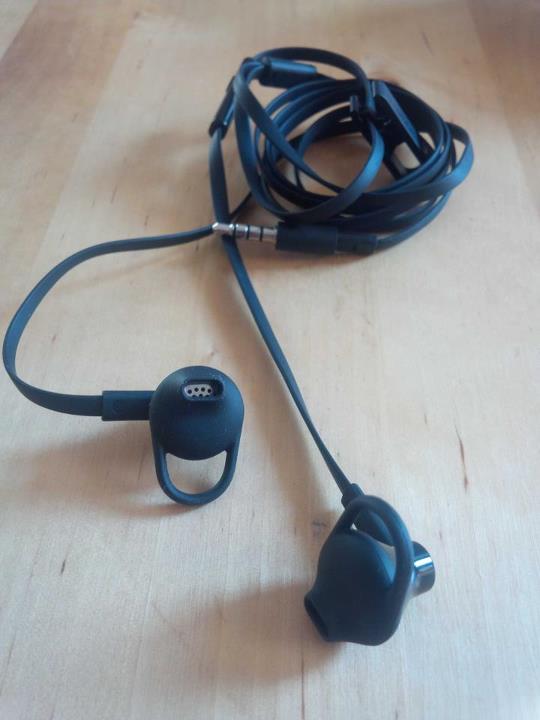
First up the very funky, tiny bit fiddly and totally good quality 'premium' headphones.
Main cool think about them is their anti-tangle wires. Previously found on headphones bundled with things like the HTC, any one familiar with anti-tangle will know just how much time they can save when pulling them from your pocket screwed up in a ball.
I have used these before in the form of A-Jays 3's, and have to say I am totally sold on anti tangles forever now.
The concept is simple, as pictured the wires are flat, so don't tie themselves up into a ball of tangled wire like conventional ones do.
Quality wise, they fit the ear beautifully once you have decided which ear bud to use. 3 to choose from, two with different sized loops, designed to squash then expand in the outer part of the ear to ensure a snug fit. Or the third option is no loop, so the bud sits gently inside the ear.
Sound is nice, anyone expecting super sharp tops, or deep bass will be disappointed. But if you grabbed a load of standard bundled headphones from BlackBerry of the past, and other devices, I'm pretty confident these would come out very near the top at worst.


Then we have the previously mentioned BlackBerry wireless bluetooth speaker. First up, a handy light little package, which is charged up using the same micro usb charger as the mainstream phones of the world, Inc the BlackBerry's. It's folded hinge design makes it great to clip on to bag chest straps, sun visors, or other thin layers of material, holding it firmly in place for whichever use you have in mind for it.
Very simple to sync up to, easy to discover via bluetooth settings, and can be up and running literally in one minute from taking it out of the box.
Volume buttons hidden away on the underside allow you to control the volume from the speaker itself, or indeed from the device that is streaming the audio. Also on the side is the power switch. A simple on/off slide back and forth style switch, complete with multi coloured LED.
Using different colours to tell you what's going on. Flashing rather than static LED, green showing on charge, blue connected via bluetooth, and red when powering on and off, or sitting on but idle.
Smartly (but maybe obviously) it will also multi indicate, so blue/green flashes to show its on charge but connected etc.
Sound quality, well it's a free standing small speaker unit, so don't expect ground shaking bass or anything. But the sound that does come out it pleasant, clear and nice to listen to. More for casual poolside or beach use, or just chilling in the park, rather than being the centre of a party.
A second use is to use it in the car as a handsfree speaker. Obviously the lack of a mic means it's not going to do the job all alone. But anyone who has tried using the handsfree on most phones will find that once you turn the volume up enough to hear the person, in a car on the motorway for example, the sound quality is lost, and conversation becomes hard.
With this little gem on your sun visor, you can be sure the conversation would be crystal clear.

And here it is, complete with a hand to demonstrate the size of the unit.


Thursday, May 2, 2013

Welcome to the Blackberry Q10

A long time in the making, but finally its here and I have to say, 1 hour in, MY GOD its good!

I have to say this first though, getting the handset has been a bloody nightmare to say the least, fighting with Yodel to get them to deliver the damn thing has kind of tainted the joy of getting it.
There is more about the epic battle in earlier blog entries.

So back to the Q10.
First up, it's fair to say I am a die hard qwerty fan, and a strong believer that the days of the physical keyboard are far from over. In fact for me, as the past hour has shown, it's a must. Plain and simple.
The Z10 has without a doubt been the best touchscreen phone I have ever used. No bones about it, the fluidity of the experience is amazing. But after months of use I still never overcame the annoyance and frustration of the keyboard predicting or correcting me on something simple, or the sheer inaccuracy of it. YES, touchscreen can be super fast, the Z is no exception, with its very forgiving predictive text and corrections. As well as a very smart learning curve, which unlike any other handset I have used, can predict almost who sentences.

However, when it comes to freedom of expression and being able to type what you want, how you want, and make words up whenever you choose, the qwerty wins every time.

So, step back a second and let's start over.
Buying mine from CPWH, I was lucky enough to get the BlackBerry bluetooth speaker system for free, which is a nice little bonus. Compact little thing, but great for sitting in the garden or office etc. I can see it getting a fair bit of use. Also doubles as a hands free for the car too as it clips to the sun visor, so win win.

Unpacking the Q10's little retail box, you realise that BlackBerry have followed the lead of brands like Apple, and made their retail offerings very sparce, but I have to be fair and say all the essentials are there. Phone, charger, data cable, headphones. Speaking of headphones, what an enormous leap forwards with the quality of headphones BlackBerry have made. In-ear anti-tangle headphones, great inline controls. Brilliant, well done BlackBerry. Not sure about Apples 'years in the making' effort, but these unannounced surprises are a great addition.

Moving on from audio, setting the phone up was a nice simple process, certainly more user friendly than the first time around with the Z10, what a nightmare that was. But then at the same time the process is nothing like device swaps of the past. Gone are the days of any BIS involvement. Simple on screen prompts put you through the various sections of set up in an easy to understand format. Once done, and all emails are set up, it syncs with the server and in a matter of minutes you are up and running. The key here is being cloud ready. If you are on Gmail etc, then the set up is a piece of cake, pulling down contacts and calendars from your online account. Second time is a treat for me for sure.

Once set up, it's time to get going with customising and setting up your preferences. The defaults are pretty well thought out, with dark theme as standard, various tones set up for native apps, and volume set to maximum (yup that scared the pants off me first message!). The aforementioned native apps as you probably know are a lot about staying in touch, BBM, Linked In, Facebook, Twitter, and all meeting up nicely in the infamous Hub. Speaking of the hub, for me it's still not perfect, but after months of use of the Z10, BB10 has become second nature, and interacting from one place is indeed a great idea. Just a shame there are not a few more user customisable options in there.

The biggest thing missing for me is the social feeds, all my Twitter updates and new tweets. But again I have to say I have grown used to Blaq saving the say there, and have been quick to install it on the Q10 as well as the Z.

The biggest joy of all is without a doubt the keyboard, for me at least. Firm, solid keys, my fingers dance around the keyboard with ease, and as they start to remember what is where, the speed of my typing increases. I have already surpassed the longest blog entry I have ever done on the Z, by double at least I would say, and I'm happy to keep going. No frustrations, just happy thinking and typing away. The straightening out of the keyboard is a little peculiar  maybe, but again you adjust quickly. Sitting in the dark, looking around as I type, I know my accuracy is far better than a touchscreen would ever be, for me at least.

The glass weave, weird looking back was a big worry for me, thinking it was going to be slippery as the back of the 9900 was, but looks are truly deceiving. And to think I almost went for a white Q10 because the back looked gripper. Phew close call there. It's waxy in feel, and has the right level of grip. Not being shiny also removes the worry of scratching it. The feel of the rest of the device is also decidedly solid and robust. No unpleasant creeks or squeeks coming from the chassis.

The screen is super sharp as you would expect from an OLED display. With screens improving year after year, it's hard to appreciate the screen until I sit it next to my other two handsets, then the difference is very apparent. With one of those being the Z10, it doesn't take a genius to work out which BB10 device has the nicer screen.

The rest of the story is yet to be told, battery testing, app testing, reliability, and over all preference of use (although I think I have already decided that one)

A final note though, and one for anyone trying to decide which BlackBerry device to buy.
If you are like me, and you spend most of your day emailing, messaging, tweeting etc, aka communicating with your phone, then the Q is the obvious choice. I know the argument is screen real estate, but the truth is, with the onscreen keyboard up, the Z's screen is exactly the same size as the Q.
If however you use your handset for games, Web, navigation etc, then the Z is probably the right option for you. The onscreen keyboard as an occasional input device is truly splendid. Forgiving, intuitive, and easy to get along with. Word suggestions, swipe gestures and great layout make it a pleasing experience. But would I have written a blog entry like this one on the Z.... Jeez no! Only the Q has what it takes to ramble on for hours in my trying to be helpful manner.

I shall be sure to post some updates soon, but for now I will give this poor new phone a breather.

Summary, now the chips are down, BlackBerry have brought TWO awesome phones to the market. Worth the extended wait for sure, now just to keep up the momentum and make and keep the BB10 movement current. Well done BlackBerry, well done indeed.


Friday, February 15, 2013

Time for a phone/ camera test (again) Part 1

I took this week off work as its my 40th birthday, or was yesterday anyway. So I thought I would have some time away from work, get some bits done around the house and in general avoid people wishing me happy birthday... I cant stand birthdays.

Anyway, its the end of the week, and its been a long week with builders in, workmen at the house, and has drained me just sitting around. So with the weather a little warmer I thought it was time to get out there and stretch my legs and get some fresh air.

Topping my Oyster Card, I headed for town (Central London / Westminster) First stop, my favourite, The Shard.

Before we get to the pictures though, I thought I would make this little observation. Both phones were 90% when I left home this morning. The Z10 was used for music (downloaded not streaming) for my journey to the station, into town and back again, while the S2 was used primarily for taking pictures, with a few chat and social apps on the go at the same time.
I wont mess around with the results, its as simple as this, with the above functions going on, and the pics being taken for comparison shots, they both lasted approx 4 hours. Make of that what you will.
Needless to say this is way short of what I have previously achieved with my 9900. But they did both take one heck of a beating, with the Z10 getting used for more photos, and Facebook. Neither did great, but both  had steady battery usage, no sudden drops, so control was maintained. The Z10 packed in yards from home, managing the last 45 mins of music while heading home.

So back to the pictures. I was somewhat surprised by the results actually, and they seemed to take it in turns to struggle with lighting conditions. Similar conditions for different shots, one would do well, then stumble on the next shot.
I shall post the pictures below, but must make the following points first:

All shots are taken from a hand held position.
I have tried to frame each shot as closely to the one from the other camera as possible.
Lighting conditions have NOT changed between any comparison shot.
Lenses were wiped clean before each shot.
Focus point on all shots is matched, and differences are in how the phone coped.
Any shot that zoom was used on, it was used on equally on both devices. x2 for example.
The file names have been changed, and images posted in mixed up order.
Both were set to auto scene, and NO flash
Both shots were taken within 1 minute of each other maximum. Usually less.

I realise that we all have different preferences in photos, some prefer depth, colour, focus, clarity etc. So im sure noone will have the exact same opinions as anyone else.

What I will say is, of all the tests I have done, this is without a doubt THE most comprehensive to date, and tried to get as many difference scenes, lighting situations, and objects as possible.

So here we go, let the pics begin. UPDATED, to show which device took which pic.
 Z  -Z10 - S - Galaxy S2

Starting with The Shard From 2 angles.
S

Z

Z

S

The last image having a large lense flare there. Both doing quite well to get the detail of the building, but some pics fairing better than others with the blue of the sky.
Next it was off to Trafalgar Square and some famous landmarks in challenging lighting conditions.
The fountain shot is on 2X zoom on both devices, while the focus points for the other shots are the sculpture at the top of the column, and the centre of the arch.

S

Z

S

Z

Z

S

Some obvious differences there, sorry for not getting Nelsons Column quite square in both shots.
Time for a wander over to St James's Park for some other pictures. Flowers, water, full zoom for the fountain, and a cute signpost shot, focused on the 'subject' in the picture.

Z

S

S

Z

Z

S


Z

S

Well, thats it for part one, as thats all the images that will go onto one blog entry, so you can view part 2 here. Part 2


Phone and camera test, Part 2


Next it was off to Buckingham Palace, and Horse Guards Parade,a low light test, a detail test with some glittering gold, and some more interesting results, I think so anyway.
Hope this isnt going on too long just yet. It was fun to do, and I did say it was my most comprehensive yet.


 UPDATED, to show which device took which pic.
 Z  -Z10 - S - Galaxy S2


S

Z

Z

S

Z

S


Z

S


S

Z

Z

S

Excuse the appearance of the child in the last shot, Central London, just can never get a clear shot for as long as you want. Pesky tourists.

Now it was over to the Houses of Parliament for some shots of the exquisite detailing in the building. Again a few varied shots, and on Sovereigns Gate a little test on the second shots to see how the phones would cope trying to catch detail in a poorly lit area, with bright light all around. I think its fair to say a certain device has struggled somewhat in this area.

Z

S

Z

S

Z

S

S

Z

Finally it was the walk back to the station, and what better way to go than along the river. London Eye for a scenic shot, Battle of Britain memorial for some nice detail of colour testing of this work of art, then a depth of field test with some Boris Bikes, and a final indoor shot of the concourse of Charing Cross Station, complete with departure boards.

Z

S

S

Z

Z

S

Z

S

And here ends my whistle stop tour of London on this fine winters afternoon.
I hope you have enjoyed the pictures.
As a footnote I will say.. YES I know the S2 is now a couple of years old, and the Z is brand new, but I am using what I own and have to hand. If nothing else, try and decide from the images which you hope would be the newer handset. Of course the true results are only a right click away, and selecting the image properties then details.

I am going to post some other pictures shortly in what is Part 3 of this blog, just some other shots I took on the Z10 today that I felt summed up the day for me, and came out quite well.